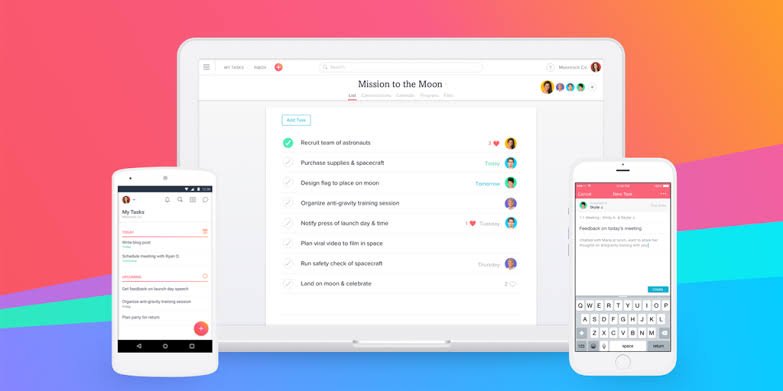
In a world where people are constantly dealing with emails, meetings, deadlines, notifications, and personal responsibilities, staying organized can be difficult. Even when you have plenty of time, it can feel like the day disappears before you finish the things that matter most. This is where productivity apps can make a real difference.
Productivity apps are digital tools designed to help people manage their time, organize tasks, plan projects, take notes, communicate with others, and build better work habits. Whether you are a student, employee, freelancer, business owner, or simply someone who wants to manage daily life more efficiently, there is likely an app that can support your routine.
However, using more apps does not automatically make you more productive. The key is choosing tools that solve real problems instead of creating additional distractions. A good productivity system should make your work simpler, clearer, and easier to manage.
What Are Productivity Apps?
Productivity apps are software applications that help users complete tasks and manage responsibilities more effectively. They can be used for simple activities such as creating a shopping list or setting reminders, as well as complex tasks such as managing a business project with multiple team members.
Some apps focus on one specific area. For example, a task-management app may help you create to-do lists and deadlines, while a note-taking application can help you store ideas and important information.
Other productivity apps combine several features in one place. They may offer calendars, task lists, project management, documents, reminders, and collaboration features.
The best choice depends on what you actually need. Someone who struggles with time management may benefit from a calendar and scheduling tool, while someone managing several projects may need a more advanced project-management platform.
Why Are Productivity Apps Useful?
One of the biggest advantages of productivity apps is that they reduce the need to remember everything mentally. Instead of keeping dozens of tasks in your head, you can write them down, assign deadlines, and receive reminders.
This can make your workload feel more manageable.
Productivity apps can also help you prioritize. When every task feels urgent, it becomes difficult to decide what should be done first. A well-organized task list can separate important responsibilities from less urgent activities.
Another benefit is accessibility. Most modern apps work across multiple devices, allowing you to check your tasks or notes from a phone, tablet, or computer. This is particularly useful for people who work remotely or move between different locations during the day.
For teams, productivity apps can improve communication and collaboration. Instead of sending endless messages to find out who is responsible for a particular task, team members can often see assignments, deadlines, and project progress in one shared workspace.
Different Types of Productivity Apps
There is no single category of productivity software. Different applications are designed for different needs.
Task Management Apps
Task-management apps are among the most popular productivity tools. They allow users to create tasks, organize them into lists or projects, set deadlines, and mark work as completed.
These apps are useful for both personal and professional responsibilities. You might use one to plan your workday, organize household chores, prepare for an exam, or manage a large business project.
Calendar and Scheduling Apps
Calendars help users understand how their time is being used. Instead of simply keeping a list of things to do, you can assign activities to specific dates and times.
Scheduling apps are especially useful for people who have frequent meetings, appointments, classes, or deadlines. They can also help prevent double-booking and provide reminders before important events.
Note-Taking Apps
Ideas can appear at any moment, and trying to remember everything can be frustrating. Note-taking apps provide a convenient place to store information.
You can use them for meeting notes, study material, business ideas, research, personal plans, or simple reminders. Search features also make it much easier to find information later.
Project Management Apps
Project-management applications are designed for larger tasks involving multiple steps or people. They can provide features such as task assignments, deadlines, progress tracking, file sharing, and team communication.
These tools are commonly used by businesses and remote teams, but individuals can also use them to organize complex personal projects.
Time-Tracking Apps
Time-tracking tools help users understand where their working hours are going. This can be particularly useful for freelancers, consultants, and people who charge clients based on time.
Even if you do not bill by the hour, tracking your time can reveal habits that may be reducing your productivity. For example, you may discover that a task you expected to take 30 minutes regularly takes two hours.
How to Choose the Right Productivity Apps
With thousands of productivity tools available, choosing one can sometimes become a productivity problem itself.
Start by identifying the specific challenge you want to solve.
If you frequently forget appointments, a calendar application may be enough. If you have difficulty remembering daily tasks, consider a task manager. If you are working with a team, look for software that supports collaboration.
It is also important to consider simplicity. An application with dozens of features may look impressive, but if it takes too much time to maintain, you may stop using it.
Before committing to a tool, check whether it works on the devices you regularly use. Cross-platform compatibility can be important if you switch between a smartphone and computer throughout the day.
Privacy and security should also be considered, particularly when an app stores business documents, personal information, passwords, or sensitive work data.
Finally, look at the pricing structure. Many productivity tools offer free versions, while advanced features may require a subscription. Make sure the features you actually need are available within your budget.
How to Use Productivity Apps Effectively
Simply downloading a productivity app will not automatically improve your habits. How you use the tool matters more than the tool itself.
Start with a small system. Choose one primary app for managing tasks rather than creating multiple lists across different platforms.
At the beginning of each day, review your responsibilities and identify the most important tasks. Avoid creating an unrealistic list containing 30 major tasks. A shorter list can make it easier to focus and make meaningful progress.
Use deadlines when they are useful, but do not give every small task an arbitrary deadline. Too many notifications can quickly become distracting.
It is also worth scheduling regular reviews. Once a week, look at unfinished tasks, upcoming deadlines, and completed work. Remove tasks that are no longer relevant and adjust your priorities.
Most importantly, remember that productivity is not about being busy every minute. The goal is to use your time intentionally and make progress on things that matter.
Common Mistakes People Make With Productivity Apps
One common mistake is using too many applications at once. Someone might have one app for notes, another for tasks, a separate calendar, several reminder tools, and multiple communication platforms. Instead of simplifying their work, they create more places to check.
Another problem is spending too much time organizing the system. Changing colors, creating complicated categories, and constantly redesigning task lists can feel productive without actually completing important work.
Notifications can also become a major distraction. If every app sends alerts throughout the day, your attention can constantly shift away from your work. Turning off unnecessary notifications can make a significant difference.
Finally, people sometimes expect technology to solve problems that are actually related to habits. An app cannot make you focused if you constantly switch between social media, messages, and unrelated tasks.
The Future of Productivity Apps
Productivity software continues to evolve as technology becomes more advanced. Artificial intelligence is increasingly being integrated into digital tools to help with tasks such as summarizing information, organizing content, generating reminders, and assisting with planning.
These features may save time, but users still need to review automated results and make their own decisions. Technology can support productivity, but it does not replace judgment, creativity, or discipline.
The future will likely bring more connected productivity systems where calendars, task managers, communication platforms, and other tools work together. For users, the biggest benefit may be reducing repetitive work and keeping important information in one accessible place.
Frequently Asked Questions
1. What are productivity apps used for?
Productivity apps are used to organize tasks, manage schedules, take notes, track time, plan projects, and collaborate with others. Their purpose is to make daily activities easier to organize and manage.
2. Are productivity apps useful for students?
Yes. Students can use productivity apps to organize assignments, create study schedules, set reminders, take notes, and track deadlines. They can also help students break larger projects into smaller tasks.
3. Can productivity apps help with time management?
Yes. Calendar, scheduling, and time-tracking apps can help users understand how they spend their time. They can also make deadlines and appointments easier to manage.
4. Are free productivity apps good enough?
For many users, free versions provide enough features for basic task management, note-taking, and scheduling. However, advanced collaboration, storage, automation, or business features may require a paid plan.
5. How many productivity apps should I use?
There is no fixed number, but using fewer tools can make your system easier to maintain. Ideally, each app should have a clear purpose rather than duplicating the functions of another application.
6. Do productivity apps really make people more productive?
They can help, but an app alone cannot create productivity. The results depend on how consistently and effectively you use the tool. Good habits, prioritization, and focused work remain important.
7. What features should I look for in a productivity app?
Useful features may include task management, reminders, calendars, search, synchronization across devices, collaboration, file storage, and customization. The most important features are the ones that solve your specific needs.
8. Can productivity apps reduce stress?
They may help reduce the mental pressure of remembering numerous tasks and deadlines. Having responsibilities organized in one reliable system can make work feel more manageable, although the overall effect depends on the user’s workload and habits.
Final Thoughts
Productivity apps can be valuable tools for organizing your work and personal life, but there is no universal app that works perfectly for everyone. The right choice depends on your responsibilities, working style, goals, and the problems you are trying to solve.
Instead of downloading every popular productivity tool, start by identifying one challenge. Choose an app that addresses that challenge, keep your system simple, and give yourself time to develop a consistent habit.
When technology is used thoughtfully, productivity apps can help you spend less time trying to remember and organize everything and more time actually getting important things done.